Seven steps, each with its time
Clear the decks, look back at 2026, your highlights and numbers, a money look-back, the wheel of life, plan 2027, and your top goals. Tick Done on a step and the card above counts down the time left.


Look back at 2026, see where your life has the most room to grow, and choose the few goals that matter for 2027.
$8 One-time paymentInstant access

Magnet Creative Recommended Creator on Notion



Travel
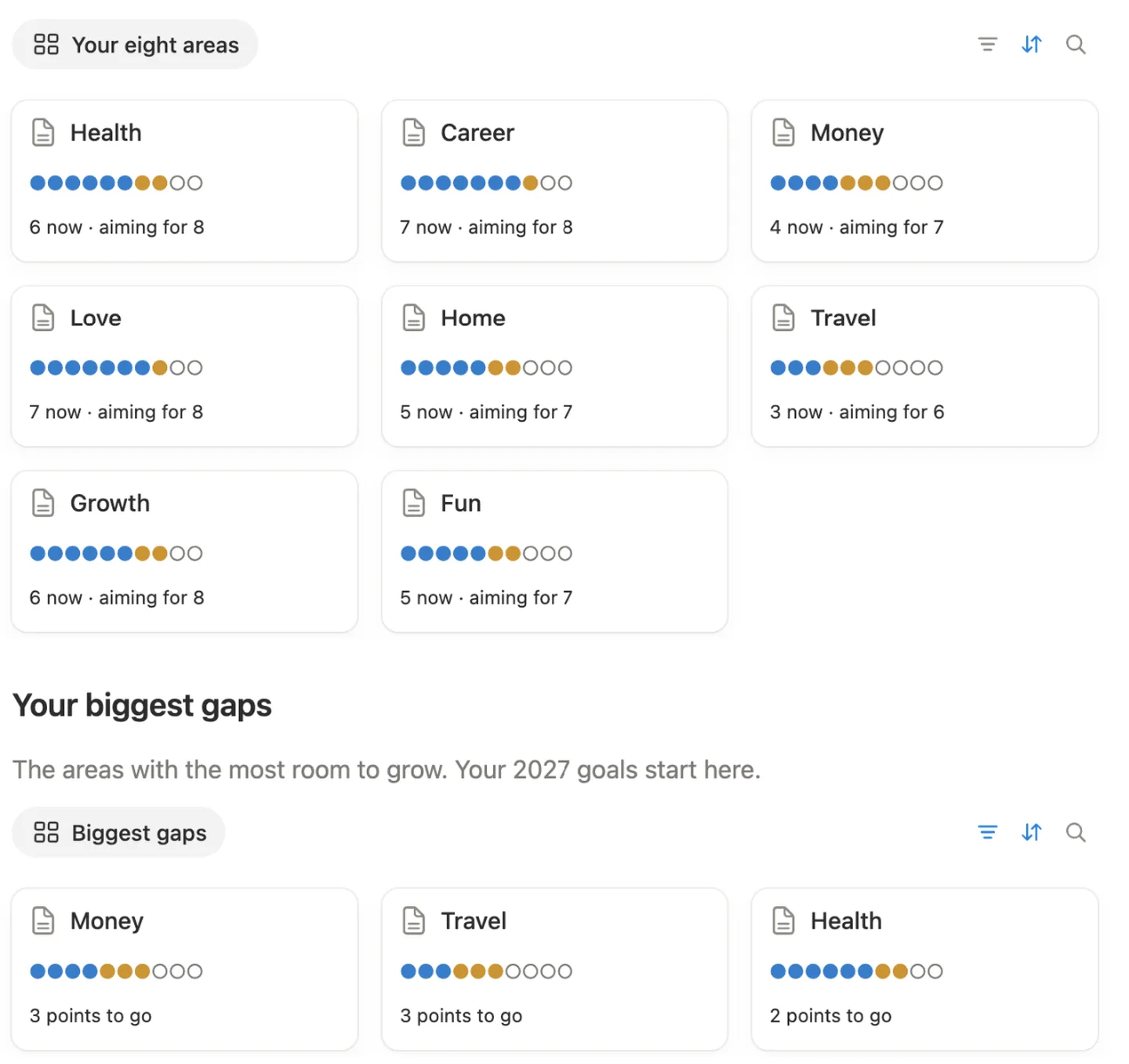
Your biggest gaps
The areas with the most room to grow.
Health
2 points to go
Career
1 points to go
Money
3 points to go
Love
1 points to go
Home
2 points to go
Travel
0 points to go
Growth
2 points to go
Fun
2 points to go
The seven steps, the look back, your moments, the wheel of life and your 2027 goals, filmed in the real template.

Before building it, we went through the most used Notion year-end reviews and read what their buyers wrote. Most stop at the questions. These are the parts we added.
Score eight areas for 2026 and set a goal for each. The three biggest gaps rise to the top, and your 2027 goals start from there.
From 15 to 60 minutes each, about three hours in all. A card on the main page shows how many steps are done and how long is left.
Around 40 questions that need only a few words. Go deeper toggles hold more for the evenings you feel like writing.
Write to yourself in step 6. The date has a reminder, so Notion brings the letter back on December 31, 2027.
We went through it from a fresh copy, the way you’ll get it: cleared the examples, answered the questions, scored the areas and moved a goal into Goals 2027. Anything that tripped us up, we fixed.
The main page holds your progress and the seven steps. Each step opens its own page with a short note on what to do and how long it takes.
Clear the decks, look back at 2026, your highlights and numbers, a money look-back, the wheel of life, plan 2027, and your top goals. Tick Done on a step and the card above counts down the time left.
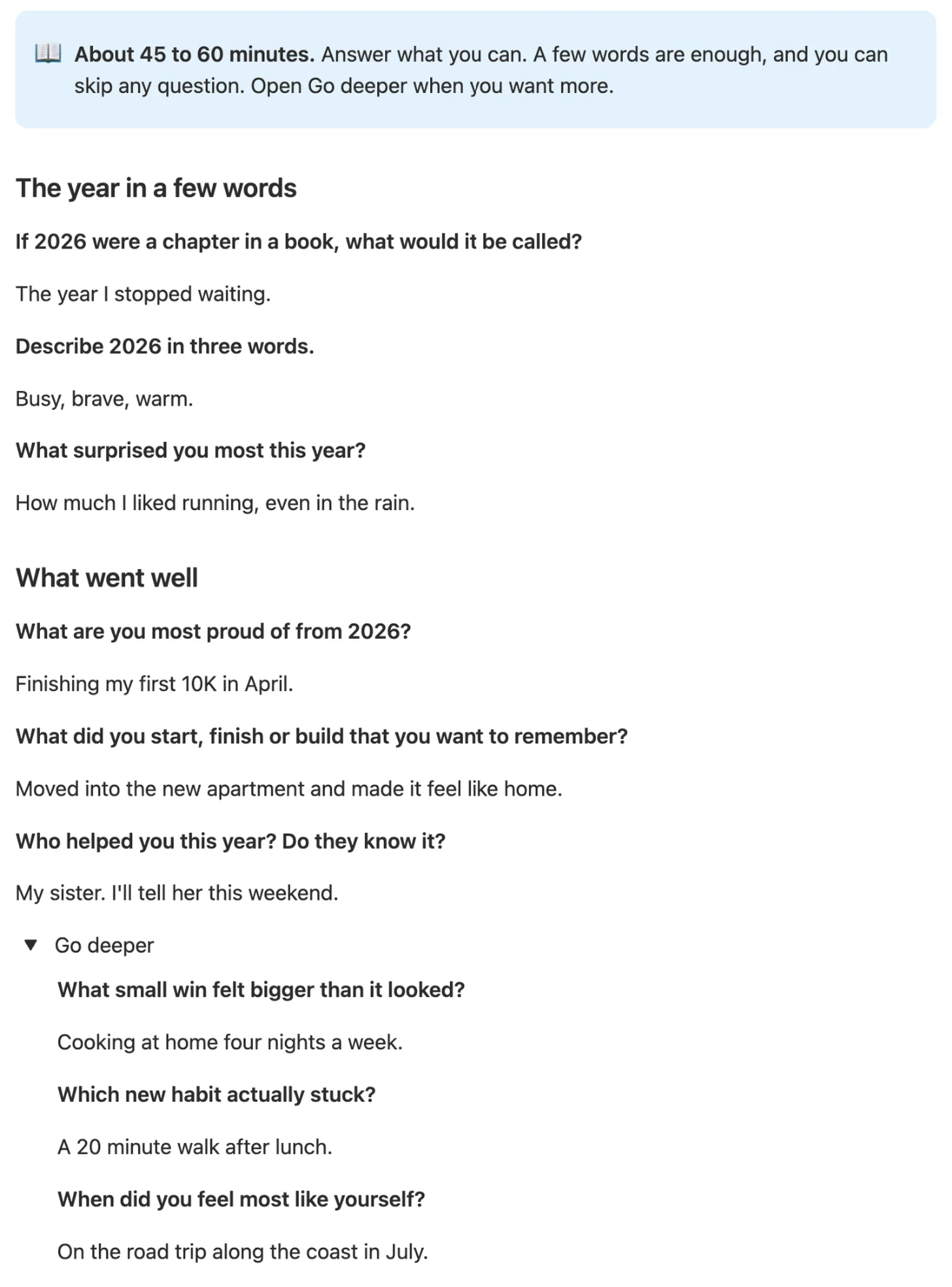
Questions in five short parts, from the year in a few words to what you leave behind. A few words per answer is enough, and Go deeper opens more.
Add a moment, pick its month and a tag like First time, Trip or People, and give it a picture. Tick your Top 3. Counts like “10 moments across 10 months” fill in on their own.

Eight areas, from Health to Fun. Give each a 2026 score and a 2027 goal from 1 to 10. Blue dots show where you are, gold dots how far you want to go, and the three biggest gaps rise to the top.
Your word for the year, the one big thing, three words for next December, what gets a yes and what gets a no, and a letter you’ll read on December 31, 2027.

Pick three to five goals from your biggest gaps. Each gets an area, a target quarter and a short reason it matters to you.

The same areas as in our Goals and Vision Board templates, so a goal can move across as it is.
Income and spending for each month. What you saved and your savings rate work themselves out, in any currency.
Every step comes filled in, so you can see how it works. One button clears them.
Four short steps inside your copy, with a picture of where to click.
Pick two or three quiet evenings in December or January.
Open the next step on the main page. The note at the top says what to do and how long it takes.
Answer in a few words, or open Go deeper when you want more.
Tick Done at the end of the step. The main page shows what’s left.
Do this once. It’s easiest on a computer.
Get it from the Notion Marketplace and add it to your workspace. A free account works.
Open Start here and click Clear sample data before you type your own numbers. The example moments and goals go away and the example money and scores are emptied.

Open step 1 on the main page. It’s optional: to skip it, tick its Done box so the time left stays right.

In step 5, open each area and type its 2026 score and 2027 goal.

To give a moment a picture, open it and click Add cover. On the free plan, uploads can be up to 5 MB.

Have Goals 2027? Move your top goals there: open a goal, click ••• at the top right, choose Move to and pick Goals inside 2027 Goals.

Starting in January or later? It works the same, since every question is about 2026.
About three hours, with a time on each step from 15 to 60 minutes. Step 1 is optional. Two or three evenings is a good pace.
Any time in December or January. Bought it later? It still works: the questions are about 2026 and your goals are for 2027.
Yes. The date in the letter has a reminder for December 31, 2027. No bell icon beside the date? Click the date and switch Remind on.
Yes. Answer what you can and leave the rest. A few words per answer is plenty.
Yes. Databases, formulas, one button and a date reminder, all part of the free plan. No charts, widgets or embeds.
No. It’s complete on its own. If you have Goals 2027, you can move your top goals into it with Move to.
Yes. Setup is easiest on a computer. After that you can answer on your phone too, though longer answers are easier on a keyboard.
From the Notion Marketplace, Notion adds it to your workspace right away. From Etsy, you download a PDF with the template link, open it and click Duplicate.
Email us at hello@magnetcreativestudio.com with the template name and what you see, and we’ll help you get it working.
| Database | What it holds |
|---|---|
| Reset steps | The seven steps, each with its minutes and a Done box. Every step is a page with its own questions. |
| Highlights | Your moments with month, tag, picture and Top 3. |
| Money in 2026 | Twelve months of income and spending. Saved and Rate are formulas. |
| Wheel of life | Eight areas with a 2026 score, a 2027 goal, the gap and the dot bar. |
| Top goals | Name, area, quarter and why: the same fields as Goals 2027, so a goal moves across cleanly. |
| Your year | One 2026 row that adds things up: progress, your numbers, the money summary and your biggest gaps. |
Pay once, clear the examples and open step 1. About three hours, over a few evenings.
$8 One-time paymentInstant access
