 Good things are on their way to me.
Today, to-dos and this month
Tick your six habits, tap Add water after each glass and see today’s to-dos next to it, along with anything you missed. Four buttons under your to-dos start a new to-do, journal page, workout or expense for today.
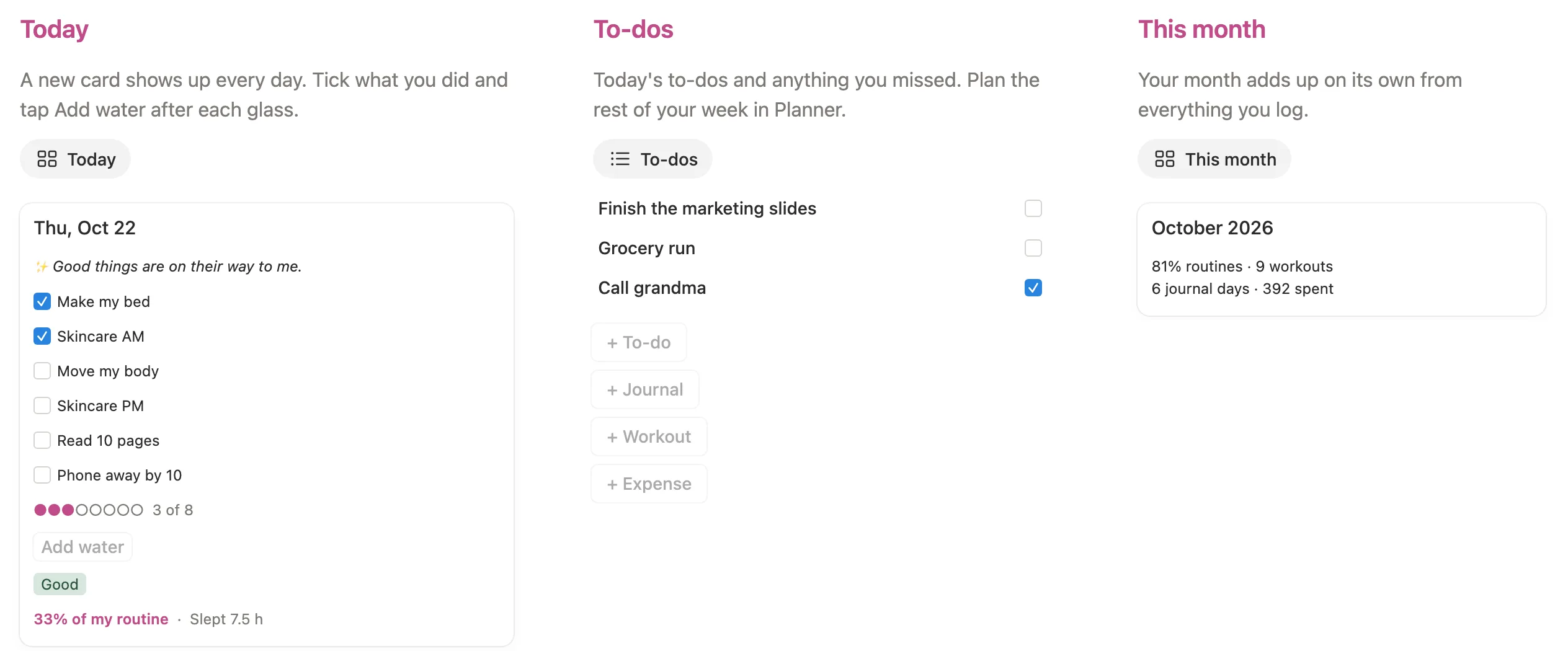

Tick your routine, tap Add water and watch your month add up, all from one pink home page.
$7 One-time paymentInstant access

Magnet Creative Recommended Creator on Notion



Thu, Oct 22
Good things are on their way to me.
3 of 8
Good
33% of my routine·Slept 7.5 h
A new card shows up every day. Tick what you did and tap Add water after each glass. Open the card to pick your mood and add your sleep.
Your Today card, the eight areas, Planner with the Sunday reset, your goals and your month, filmed in the real template.

Before building it, we went through the most used that girl and it girl planners for Notion and read what their buyers wrote. Most look lovely, but you fill in the week by hand and start over every Sunday. These are the parts we changed.
A Today card waits for each day until December 31, 2027, and your weeks and months are set up too. Nothing to copy or reset by hand.
Your habits, water, mood and to-dos sit together at the top of the main page, so a busy morning takes a few taps.
Routine score, workouts, journal days and spending fill in from what you tick and log, like “81% routines · 9 workouts”.
Untick an area and it leaves your main page. Keep three or all eight, and bring one back whenever you like.
We set it up from a fresh copy, the way you’ll get it: cleared the examples, renamed a habit, tapped Add water and added a to-do of our own. We checked every page at phone size too, and smoothed out anything that felt slow.
The main page shows today, your to-dos and this month, with your eight areas underneath. Each area opens its own page with one or two simple views.
Tick your six habits, tap Add water after each glass and see today’s to-dos next to it, along with anything you missed. Four buttons under your to-dos start a new to-do, journal page, workout or expense for today.
Give a to-do a date and it lands under Overdue, Today, Tomorrow, This week or Later. Once a week, tick six reset jobs like Fresh sheets and answer three quick questions.

This week’s seven days with a dot for every habit you ticked, and a card for each month with your routine score and full days.

Log a workout with its type and minutes, plan the week’s meals, and see your water and sleep averages for the month.

Tap + Journal for a page with the day’s question and a line for what you’re grateful for. The mood you pick on your Today card colors a calendar for the month.

Choose one word for 2027, swap the six vision board pictures for your own, and break each goal into small steps with a bar that fills as you tick them.

Each expense is a card under its category, from Food to Self-care. The month shows what you spent, earned and saved, and every savings goal has its own bar.

One place for the things you want to keep track of, each with its own status.
Assignments, exams, projects and work shifts under Overdue, This week and Later, with the days left on each.
Add your own and one of them shows on your Today card each morning.
Every area comes filled in, so you can see how it works. One button clears it.
Five short steps inside your copy, with a picture of where to click.
Open the main page. Today’s card is waiting at the top.
Tick what you did and tap Add water after each glass.
Open the card to pick your mood and add your hours of sleep.
Add to-dos with the buttons. On Sunday, open Planner and do your reset.
Do this once. It’s easiest on a computer.
Buy it on the Notion Marketplace and add it to your workspace when Notion asks. A free Notion account is enough.
Open Start here and click Clear sample data. The example to-dos, workouts, journal pages, money and lists go away, and the example days are emptied. Your vision board pictures and affirmations stay.

Open today’s card, click a habit name such as Read 10 pages, choose Rename and type your own. The new name shows on every day.

In step 3 of Start here, untick any area you don’t need. It leaves the main page until you tick it again.
Open Goals and Vision Board. Type your word in Word of the year, then add a few affirmations with New.

That’s it. Each day, tick your card, tap Add water and add your to-dos.

Starting later in the year? Clear the examples first. Every day until December 31, 2027 already has its card.
Yes. Everything in it runs on databases, formulas and buttons, and the free plan has all three.
Yes. Clear the examples first. Every day until December 31, 2027 already has a card, and a month’s score begins on the day you first tick.
Yes. On today’s card, click the habit’s name, choose Rename and type your own. All your days update at once.
No. Untick the ones you don’t need in step 3 of Start here and they leave your main page. Tick them again any time.
No. School and Work has room for classes and shifts, and you can hide it like any other area.
Yes. Setup is easiest on a computer. After that, add the main page to Favorites in the Notion app and your Today card is one tap away.
From the Notion Marketplace, Notion adds it to your workspace right away. From Etsy, you download a PDF with the template link, open it and click Duplicate.
Email us at hello@magnetcreativestudio.com with the template name and what you see, and we’ll help you get it working.
| Database | What it holds |
|---|---|
| Days | One card per day with six habit boxes, water, mood, sleep and the day’s affirmation. |
| Weeks | One card per week with the six reset boxes and three short questions. |
| Months | Adds up routines, workouts, journal days, water, sleep and money for each month. |
| To-dos | Date, area and star. A formula sorts each one into Overdue, Today, Tomorrow, This week or Later. |
| Journal, Workouts and Meals | A page per entry with its date, so each lands in the right week and month. |
| Goals and Goal steps | Each goal links to its steps, and the bar counts the ones you ticked. |
| Money and Savings goals | Spent or earned with a category, and what you are saving for with a target. |
| My areas | The eight area cards and the box that shows or hides each one. |
Pay once, clear the examples and tick your first Today card.
$7 One-time paymentInstant access
