Today, posting today and coming up
The day’s idea with its type, like Story or Ask, and a Plan it button. Next to it, the posts dated today and the holidays coming up in the next month.
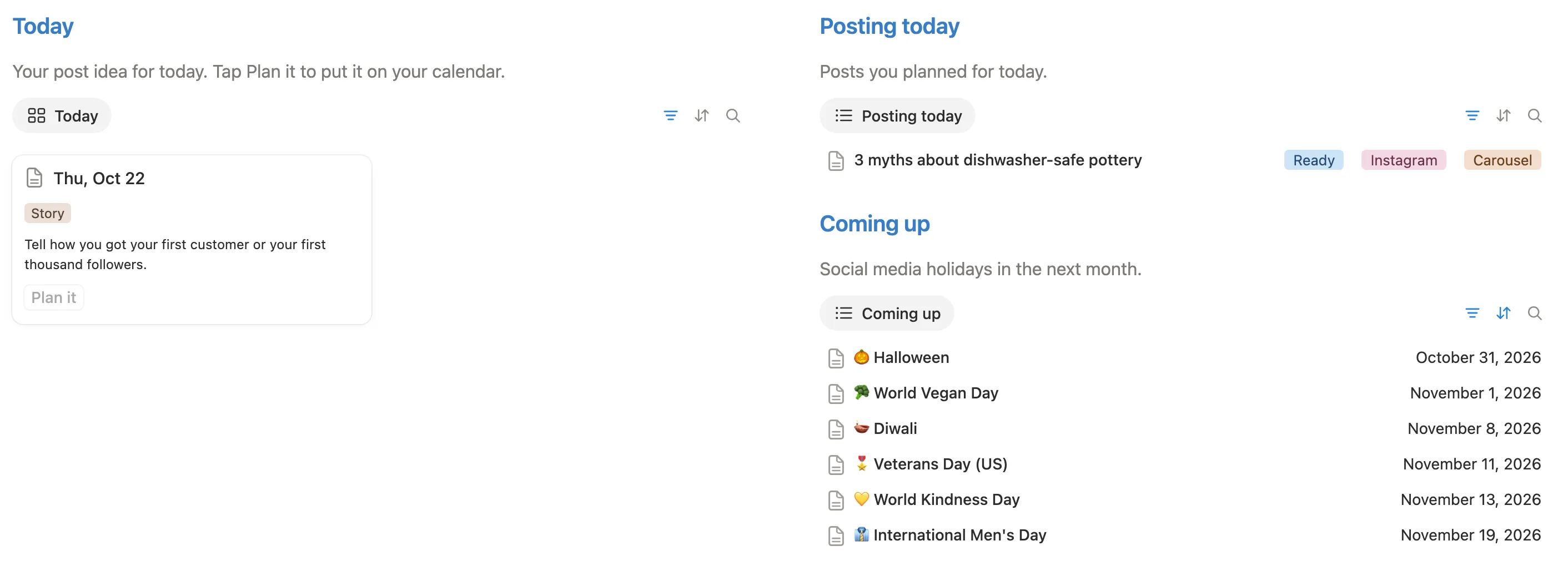

Open it to a post idea for today, tap Plan it, and follow every post from idea to posted.
$5 One-time paymentInstant access

Magnet Creative Recommended Creator on Notion



Thu, Oct 22
Story
Tell how you got your first customer or your first thousand followers.
Posting today
Your post idea for today. Tap Plan it to put it on your calendar.
Today’s idea, Plan it, the calendar, the pipeline and the monthly look back, filmed in the real template.

Before building it, we went through the most used content calendars for Notion and read what their buyers wrote. Nearly all of them hand you an empty calendar, and an empty calendar doesn’t answer “what do I post today?”. These are the parts we added.
Each day until December 31, 2027 comes with a post idea, with a theme for every month and a rhythm for the week: a tip on Monday, a story on Thursday, a win on Friday.
Social media holidays from October 2026 to the end of 2027 sit on your calendar, each with a post idea inside.
Plan it turns today’s idea into a post with today’s date, ready for your own words.
Status, platform and format on every card, then views, likes and comments once it’s live. Your best posts rise to Top posts.
We set it up from a fresh copy, the way you’ll get it: deleted the sample posts, planned a few ideas, moved them to Posted and filled in a month’s look back. We checked it at phone size too, and changed whatever slowed us down.
The main page opens on today’s idea and what you’re posting today. Below it are the week’s ideas, the month on a calendar, your pipeline and a look back at each month.
The day’s idea with its type, like Story or Ask, and a Plan it button. Next to it, the posts dated today and the holidays coming up in the next month.
Seven cards, Monday to Sunday, each with an idea and its type. Plan the ones you like and skip the rest.

Every post and holiday by date, with its status and platform on the card. Drag a card to move it to another day.

Your posts sorted into Idea, Drafting, Ready and Posted. Change a post’s status and it moves to the next column.

Status, date, platform, format, pillar and hook at the top, then room for your caption, script or notes and hashtags. After it goes live, add views, likes and comments.

Ideas without a date wait in the Idea bank until you give them one. Tick Top post on the ones that did best and they gather in one list.

A card for each month from October 2026 to December 2027, each with its theme. Open one at the end of the month to see its posts and answer three short questions.

Rename them or remove the ones you don’t use.
Reel, Carousel, Photo, Story, Video, Short, Text and Live.
Tips, Behind the scenes, Community and Offers to start. Rename them to fit your work.
A few weeks of example posts show how it looks once it’s in use. Delete them in one go.
Four short steps inside your copy, with a picture of where to click.
Open the main page and read today’s idea.
Like it? Tap Plan it and rewrite it in your own words. Don’t? Skip it.
Pick a platform and a format, and move the status along as you go.
Once it’s live, add the numbers. At the end of the month, open its card.
Do this once. It’s easiest on a computer.
Buy it on the Notion Marketplace and add it to your workspace when Notion asks. A free Notion account is enough.
Open Start here and delete the sample posts: tick the box at the top of the list to select them all, then click the trash icon. Your ideas and holidays stay. This step needs a computer.

On the main page, tap Plan it on today’s card. A new post opens with that idea and today’s date.

Change the words, pick a platform and a format, and set the Status as you go.

Starting later in the year? Every day until December 31, 2027 already has its idea, so you can begin on any day.
No. They’re there to get you started. Skip any you don’t like, or plan one and rewrite it.
No. It’s where you plan, write and track your posts. You still post them in each app yourself.
Social media holidays from October 2026 to the end of 2027, like World Kindness Day, each with a post idea inside. Ramadan and the two Eids depend on the moon, so they’re marked expected.
Yes. Every day until December 31, 2027 already has an idea, so you can begin on whatever day you buy it.
Yes. Everything in it runs on databases, formulas and one button, and the free plan has all three.
Yes. Deleting the sample posts is easiest on a computer. After that, add the main page to Favorites in the Notion app and plan from your phone.
From the Notion Marketplace, Notion adds it to your workspace right away. From Etsy, you download a PDF with the template link, open it and click Duplicate.
Email us at hello@magnetcreativestudio.com with the template name and what you see, and we’ll help you get it working.
| Database | What it holds |
|---|---|
| Days | One row per day from October 2026 to December 2027, with its post idea, type and holiday. |
| Posts | Name, date, status, platform, format, pillar, hook, link, views, likes, comments and Top post. |
| Months | One card per month with its theme, its posts and three questions. |
Pay once, delete the sample posts and plan today’s idea.
$5 One-time paymentInstant access
